BI and Data Lake
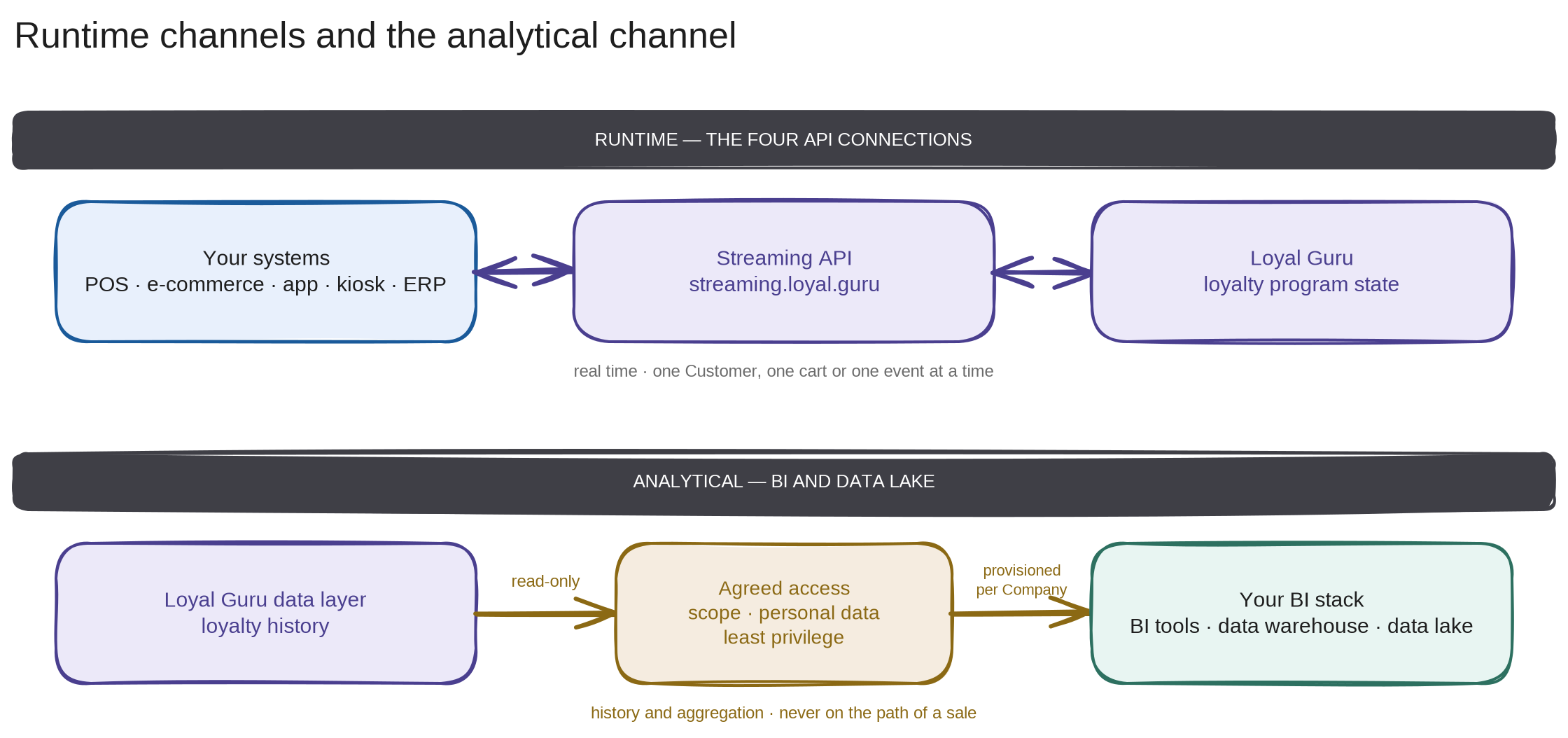
The other four connections exist to run the loyalty program: they load data in, evaluate the cart at checkout, feed your frontends and push events out. None of them is a good way to answer how did the campaign perform across the estate last quarter — that is an analytical question, and pulling it through a transactional API means paginating volumes the API was never shaped for.
For that, Loyal Guru offers read-only access to the data layer, so your BI tools and your data lake can read loyalty data directly.
This is the one connection that does not go through the Streaming API, and the one that never sits on the path of a sale.
This guide is a single page. Most of the work in this connection is agreement rather than code, and the sections follow that order — decide whether the question belongs here, settle the scope and the personal data handling, then request the access:
| Section | What it covers |
|---|---|
| Who this is for | The system types that consume this connection, and what each does with it. |
| When to use it | Which questions belong here and which belong to one of the other four connections. |
| What it gives you | The access itself, in practical terms. |
| What to agree before you use it · How to request it | Scope, personal data, least privilege, cost and freshness — the decisions the provisioning conversation needs, and who to ask. |
| Where it sits in the project | When to open it relative to the rest of the integration, and what to start early anyway. |
| Troubleshooting | The reconciliation questions that come up once the first dashboards exist. |
Who this is for
| System type | What it does with this connection |
|---|---|
| BI tooling | Queries loyalty data directly to build reports and dashboards |
| Data warehouse | Keeps loyalty data alongside sales, stock and CRM data for combined analysis |
| Data lake | Ingests loyalty data on a schedule for downstream analytical use |
Most of the effort in this connection is agreement rather than code: scope, personal data handling and access control take longer to settle than the queries take to write.
When to use it
Each connection answers a different kind of question. This one answers the analytical ones.
| You need | Use | Why |
|---|---|---|
| An answer during the sale | Loyalty Management & Promotional Engine | Milliseconds matter, volumes are small |
| To load data into Loyal Guru | Data | This channel is read-only |
| To show loyalty data to a Customer | Embedded Loyalty | One Customer at a time, in real time |
| To react to something as it happens | Webhooks | Push, not poll |
| To analyse history, or feed a data lake | Direct data layer access | Volume and aggregation, without paginating an API |
The distinction that matters: this is an analytical channel, not a runtime one. It is not a substitute for an API call at the checkout, and it should never sit on the critical path of a sale.
What it gives you
- Read-only access to loyalty data for reporting and analysis
- A path to synchronise Loyal Guru data into your own data warehouse or data lake
- Query-level access from the BI tooling you already use, rather than an export you have to schedule and parse
What to agree before you use it
Direct access to a data layer is a governance decision as much as a technical one. Settle these before the access is opened, not after the first dashboard is built:
| Topic | What to decide |
|---|---|
| Scope | Which data the access covers, and which it deliberately does not |
| Personal data | How Customer personal data is handled, masked or excluded, and under which legal basis |
| Least privilege | Which named accounts hold the access, and how it is revoked |
| Query cost | Who owns the cost of the queries, and whether there are limits |
| Refresh expectations | How current the data is, so dashboards do not imply a freshness they do not have |
| Contractual terms | Availability and support expectations for an analytical channel differ from those of the API |
How to request it
This access is provisioned per Company. Ask your account manager or the Loyal Guru integration team, with the scope and the intended use — the answers to the table above are what the provisioning conversation needs.
Where it sits in the project
This connection is not part of the dependency chain that governs the other four. Nothing downstream waits for it, and it is normally opened once the data it is meant to report on exists — after the Data load is stable and the program is live, or close to it.
Two things are worth starting early anyway, because both are slow to resolve and neither depends on the integration being finished: the personal data question with whoever owns it on your side, and the scope of the access.
Troubleshooting
| Symptom | Likely cause | What to check |
|---|---|---|
| Figures do not match what the Owner App shows | Different date range, Company scope or metric definition, or the reporting lag agreed at provisioning | Compare the filters applied on both sides before assuming a data problem, and check the refresh expectation that was agreed |
| A field you expected is not available | It falls outside the agreed scope, or it is personal data that was deliberately excluded | The scope agreed at provisioning; extending it is a new conversation, not a query change |
| Recent activity is missing | The access reflects the agreed refresh cadence, not the runtime state | Whether the question actually needs real time — if it does, it belongs to one of the other four connections |
| Queries are slow or unexpectedly expensive | Wide scans without date or Company filters | Aggregate and filter at the source rather than pulling raw volume into the BI tool |
| Access stopped working | Credential rotation, or a named account that was revoked | The account owner on your side, then the Loyal Guru integration team |
Related pages
- Data — loading data into Loyal Guru, the inbound counterpart to this connection
- Integration model — choosing the right channel per flow
- Integration checklist — where this sits in the project sequence
Related API Reference
This is the one connection that does not go through the Streaming API: there is no endpoint to call and no schema to map. The reference below is here for the boundary — when a question needs the runtime state rather than the analytical layer, it stops being a query and becomes an API call in one of the other four connections.